How to Generate and Make Remita RRR Payment in Nigeria
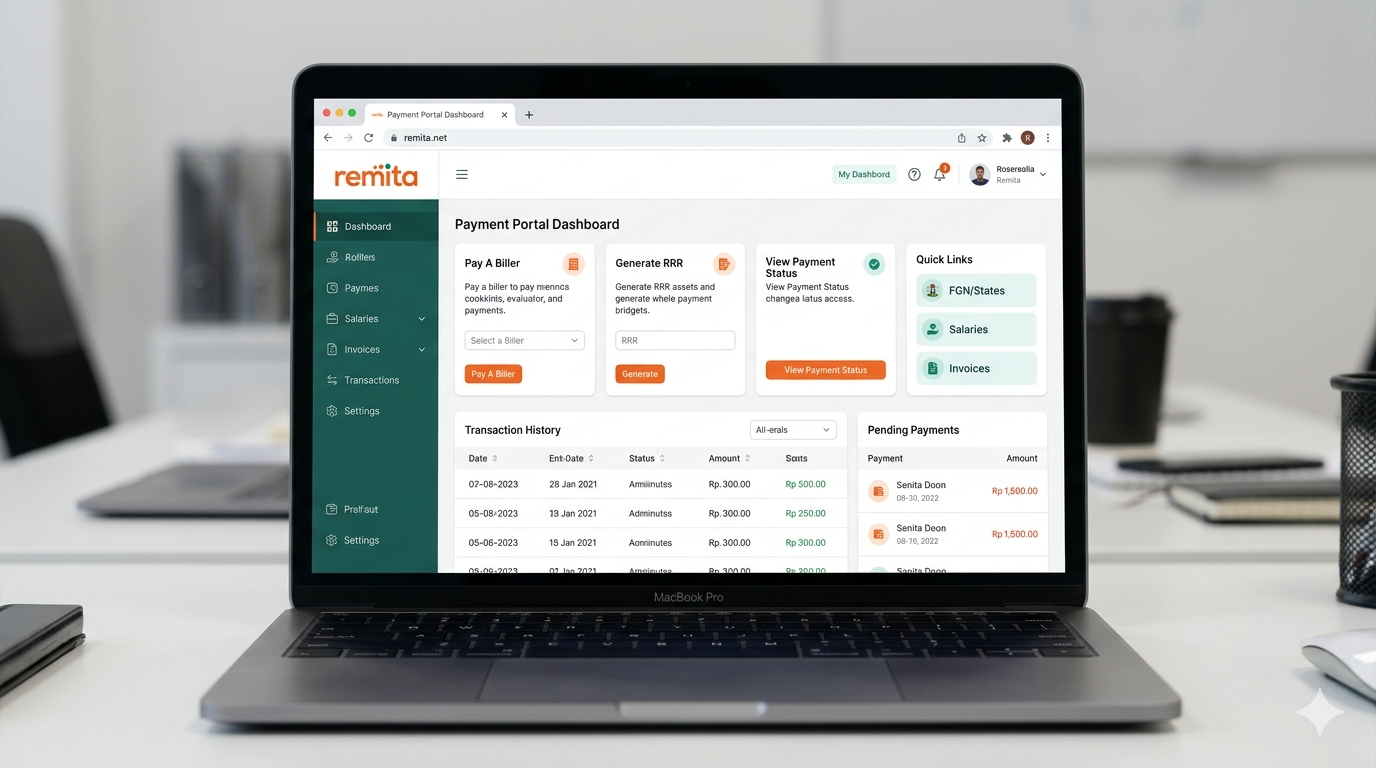
Remita RRR Payment in Nigeria is something most people come across when paying school fees, NYSC charges, taxes, or other government bills. RRR (Remita Retrieval Reference) is a unique number generated for every payment processed through the Remita platform.
In this article, you’ll learn everything you need to know about generating and paying for RRR, from how it works, to step-by-step payment instructions, and what to do if something goes wrong during the process.
What Is Remita RRR Payment?
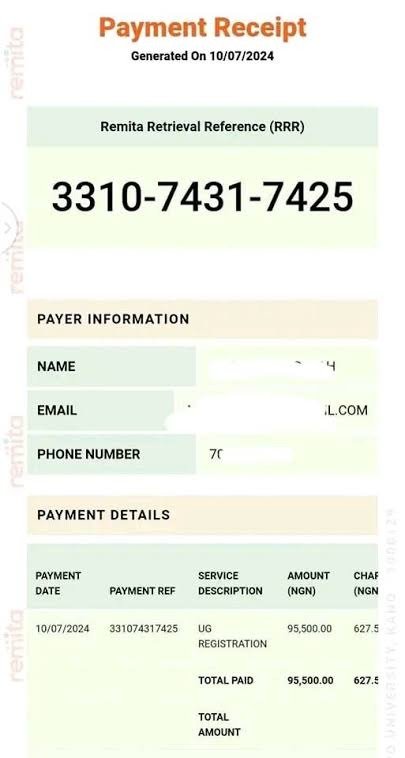
RRR stands for Remita Retrieval Reference. It’s a unique 12-digit number that is automatically generated whenever you want to make a payment through the Remita platform. Think of it like a receipt number, except it comes before you pay, not after.
That number is what links your payment to the correct institution or organization. Without it, your money could go to the wrong place or even fail to reflect properly. So yes, the RRR is very important.
How Remita RRR Payment in Nigeria works
Remita is an e-payment platform developed by SystemSpecs, a Nigerian fintech company. It gained major recognition when it was adopted as part of the federal government’s Treasury Single Account (TSA) initiative, introduced in 2015. Since then, it has become the main system for processing most government-related payments in Nigeria.
Here’s how the process works in simple terms:
- An organisation (school, government agency, or business) creates a payment profile on Remita
- You visit the Remita platform and generate an RRR for your specific payment
- You make payment using any available method, bank, card, transfer, or USSD
- The payment is confirmed and recorded in real time
- You receive a receipt, and the institution is automatically notified
Why RRR Is Important for Payments
Without a valid RRR, your payment cannot be processed. It is not optional. Whether you’re paying JAMB registration fees, NYSC levies, or a government fine, that 12-digit code is what makes the transaction traceable and valid.
It also helps prevent fraud. Since every RRR is unique and linked to a specific amount and purpose, you cannot reuse someone else’s code for a different payment.
What Does RRR Mean?
When you see “RRR” on a Remita payment slip or portal, here’s exactly what it means:
| Components | What it Represents |
| R (Remita) | The platform through which the payment is processed |
| R (Retrieval) | The system’s ability to pull up and track your specific payment |
| R (Reference) | A unique identifier linked to your exact transaction details |
Together, they form a transaction ID that is completely unique to your payment. No two RRR codes are ever the same.
How the RRR Number Is Generated
The RRR number is generated automatically by the Remita system once you enter your payment details. It’s not something you create manually. The system looks at the amount, the payer’s details, the receiving institution, and the payment purpose, then produces a unique 12-digit code instantly.
Some organisations generate the RRR for you and send it to your email or phone. Others require you to generate it yourself on the Remita portal. Either way, the process takes less than two minutes.
Types of Payments You Can Make With Remita RRR
Remita is not just used for one type of payment. It supports many different transactions. Here are some of the most common ones:
School Fees Payment
Many Nigerian schools, universities, and polytechnics, including federal and state institutions such as UNILAG, UI, FUTA, OAU, UNIUYO, and many others, use Remita to collect school fees.
Students simply generate an RRR from their school portal and then pay online or at any bank.
This has made things much easier compared to the old system where students had to queue for bank drafts and fill long forms at specific bank branches.
JAMB and Educational Payments
JAMB (Joint Admissions and Matriculation Board) uses Remita to collect JAMB registration fees for UTME and Direct Entry candidates. The RRR is generated during the online registration process and must be paid before you can proceed with your exam profile setup.
Government Taxes and Levies
Federal government agencies like FIRS (Federal Inland Revenue Service), CAC (Corporate Affairs Commission), NCC, and several others process payments through Remita. Whether you’re paying company registration fees, renewing a licence, or settling a tax obligation — RRR is your starting point.
NYSC Payments
Corp members use Remita for various NYSC-related payments, from registration to documentation fees. Some state NYSC secretariats also process welfare and allowance-related transactions through the platform.
Business and Corporate Payments
Companies can use Remita to pay suppliers, contractors, and government bodies. The platform also supports payroll processing for organisations operating within the TSA framework.
How to Generate a Remita RRR Payment Code
Information Required Before Generating an RRR
Before you start, have these details ready:
- Full name (as it appears on your ID)
- Phone number linked to your bank account
- Email address (for receiving your receipt)
- Exact amount to pay (as specified by the institution)
- Name of the institution/organisation you’re paying
- Purpose of payment (e.g., school fees, JAMB registration, tax levy)
Step-by-Step Guide
- Visit the Remita website: go to www.remita.net on your browser
- Click on “Pay a Federal Government Agency” or the relevant option on the homepage
- Search for the organisation you want to pay — type their name in the search box
- Select the correct payment type from the dropdown menu provided
- Enter your personal details
name, phone number, email address, and amount
- Click “Proceed” — the system will instantly generate your 12-digit RRR code
- Save or write down your RRR immediately — you’ll need it to complete the payment
- Check your email — Remita sends a confirmation with your RRR and full payment details
Pro tip: Take a screenshot of your RRR page immediately after generation. This saves you from stress if you lose network connection or accidentally close the browser tab.
How to Make a Remita RRR Payment Online
Once you have your RRR code, you can pay through several channels. Let’s walk through each one:
Payment Through Bank Transfer
This is the most common method for Nigerians. Here’s how:
- Log in to your mobile banking app
- Select “Transfer” or “Pay Bills”
- Look for Remita as a biller — or enter your bank’s Remita collection account details
- Enter your RRR number as the payment reference
- Input the exact amount
- Confirm and authorise the transaction with your PIN or OTP
Payment With ATM Card
- Visit remita.net and click on “Pay RRR”
- Enter your 12-digit RRR number
- Confirm the payment details displayed on the screen
- Click “Pay” and select card payment
- Enter your card number, expiry date, and CVV
- Complete OTP verification sent to your registered phone number
- Save your receipt — you’re done
Payment Through Internet Banking
If you use GTBank, Access, Zenith, First Bank, or any major Nigerian bank’s internet banking platform, you can pay your Remita RRR directly through the bills payment or government payment section. Simply look for “Remita” as a listed biller, enter your RRR, and follow the prompts.
How to Pay Remita RRR Through a Bank
Paying at Commercial Banks
If you’re not comfortable with online payments, you can walk into any commercial bank in Nigeria and make the payment over the counter. No special branch required.
- Walk into any branch of any bank in Nigeria
- Request a Remita payment teller form at the counter
- Fill in your RRR number, payment amount, and personal details
- Submit the form to the teller with cash or your debit card
- Collect your payment receipt and keep it safe
What to Take Along to the Bank
- Your 12-digit RRR number — printed or written clearly
- Valid ID — National ID card, Voter’s card, Driver’s licence, or International passport
- Exact payment amount in cash, or your debit card
- Your email address for receipt delivery
Bank tellers handle hundreds of Remita payments daily. Just hand over your RRR, stay calm, and let them guide you through the rest.
How to Verify a Remita RRR Payment
Checking Payment Status Online
- Go to www.remita.net
- Click on “Confirm Transaction” or “Check Payment Status”
- Enter your 12-digit RRR number
- The system will display the current status of your payment in real time
How to Confirm Successful Transactions
A successful Remita payment will clearly show:
- Status: “Paid” or “Successful”
- Transaction date and time
- Exact amount paid
- Payer’s full name
- Name of the receiving organisation
You should also receive a confirmation email from Remita shortly after payment. If the institution operates a well-integrated system, they’ll receive an automatic notification on their end too.
Common Remita RRR Payment Problems and Solutions
Because nothing in life is easy, here are the most common issues people face and exactly how to handle them.
| Common RRR Problems | Problem | Solution |
| Invalid RRR Number | You enter your RRR and get an “invalid” error message. | Double-check the number. RRR codes are exactly 12 digits long. Make sure you don’t skip a digit or accidentally add an extra one. Also confirm that the RRR was generated for the correct institution and payment type. |
| Failed Transactions | Payment didn’t go through, but your banking app shows a debit. | Wait 10–15 minutes and check your payment status on Remita using your RRR. Bank transactions sometimes have a short processing delay.If status still shows “pending” after 30 minutes, contact your bank’s customer service with the transaction reference |
| Debit Without Successful Payment | Money left your account but the institution shows no record of the payment. | Keep your bank debit alert and check Remita payment status. If the RRR shows “paid” on Remita but the school or agency can’t confirm it, send your Remita receipt directly to their finance or bursary department. |
| Delayed Payment Confirmation | Payment was made but the confirmation email hasn’t arrived. | Check your spam or junk folder first, Remita emails sometimes land there. If it’s been over 2 hours and there’s still nothing, log into Remita and verify your payment status manually using your RRR number. |
Benefits of Using Remita RRR Payment
- Convenience:You can generate an RRR at 11pm from your bedroom and pay it at 6am before work. The system doesn’t sleep and honestly, neither do payment deadlines.
- Security: The RRR is unique, tied to a specific transaction, and cannot be duplicated.
- Fast Processing: In most cases, your payment reflects within 15-30 minutes. Bank counter payments can sometimes take up to 24 hours, but online and mobile payments are almost always instant.
- Nationwide Access: Whether you’re in Lagos, Uyo, Calabar or Sokoto, as long as you have a bank account and a phone, you can complete a Remita payment.
Read more: Hawkit Minimum Withdrawal With Hawkit Payment Proof
How to Avoid Payment Scams
Scammers are everywhere, so it’s important to be careful when making Remita payments.
Here are some simple safety tips to follow:
- Always use the official Remita website
- Do not share your RRR number with strangers claiming the want to help you make payment.
- Avoid making payments on random public and cybercafe computers.
- Do not send money through Whatsapp groups or unverified agents.
- Remita will never ask for your ATM pin or internet banking password.
Wrapping It All Up
At some point, almost every Nigerian will need to use Remita RRR for one payment or another. It could be for JAMB registration, school fees, NYSC payments, taxes, or other government charges.
While it may look confusing at first, the process becomes much easier once you understand how it works.
All you really need to do is generate your RRR, choose a payment method that works for you, complete the payment, and keep your receipt safe.
The process is usually straightforward when you follow the correct steps.
There may be times when payments delay or confirmation takes longer than expected, especially with bank transfers. But instead of panicking, simply check your payment status on Remita and contact the right institution if needed.
Remita has made payments more organized and accessible compared to the old methods many people struggled with years ago. Just make sure you use the official platform, enter the correct details, and avoid making rushed payments through untrusted sources.