USSD Code to Check NIN Number in Nigeria *346#: Everything You Need to Know (JAMB, Banking, SIM, Jobs, etc.)
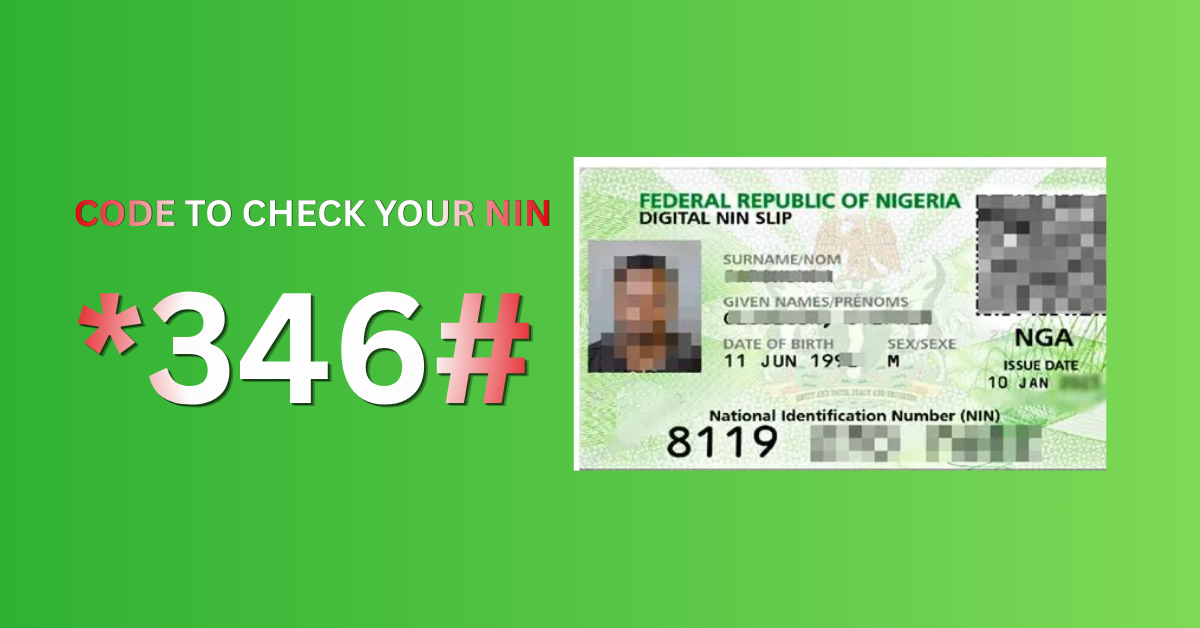
The code to check NIN number in Nigeria makes it easy to access your National Identification Number (NIN) anytime you need it. Instead of searching for your slip or visiting an office, you can simply dial *346# on your phone and get your NIN in seconds.
Maybe it’s JAMB registration season, and the portal is asking for your NIN, or your bank requires your NIN to complete a transaction at the counter. Or maybe MTN, Airtel, or Glo are threatening to ban your SIM card, even when your number has been the same for eight years. Whatever brought you here to learn about the NIN; you’re in the right place.
Your National Identification Number (NIN) is no longer just a number. In Nigeria today, it’s basically your digital identity card, your “oya, verify yourself” pass for almost everything official. And if you don’t know it off the top of your head? That’s okay. Most people don’t.
This guide covers every code to check your NIN number in Nigeria, fast, simple, and broken down by use cases — JAMB, banking, SIM registration, job applications — we’ve got them all. No running around; just the codes and what to do with them.
What Even is an NIN and Why Is Everyone Asking for It?
Quick refresher before we dive in.
Your NIN is an 11-digit unique number assigned to you by the National Identity Management Commission (NIMC) when you enroll in the National Identity Database. Think of it as Nigeria’s version of a Social Security Number, it ties your biometric data (fingerprints, photo, personal details) to one permanent identity.
NIN is the foundation of digital identity in Nigeria. Without it, you are practically invisible to the system.
— NIMC, 2021
Since the Nigerian government mandated NIN-SIM linkage and extended its use to banking, JAMB, job applications, and government services, the demand for NIN has gone from “nice to have” to absolutely non-negotiable.
If you don’t have one yet, head to the nearest NIMC enrollment center first. If you have one but can’t remember it — keep reading.
The Main USSD Code to Check NIN Number in Nigeria
Let’s start with the most important thing you came here for.
USSD Code: *346#
This is the official, government-approved USSD code to check your NIN on any mobile network in Nigeria — MTN, Airtel, Glo, 9mobile, it doesn’t matter.
Here’s how to use it:
1. Open your phone’s dialer ( the regular call app)
2. Type *346#*
3. Press the call/send button
4. Follow the on-screen prompts
5. Your NIN will be displayed on your screen
That’s it. Thirty seconds. Done!
Pro tip: The number you dial from must be the one linked to your NIN. If your SIM hasn’t been linked yet, this may not work, but more on that below.
Code to Check NIN for Each Network – *346#
Here’s the thing, *346# works across all networks. But some networks have their own dedicated options too.
| Networks | USSD Code | Notes |
|---|---|---|
| MTN | *346# | Works perfectly, primary option |
| Airtel | *346# | Same universal code applies |
| Glo | *346# | Universal code works here too |
| 9mobile | *346# | Confirmed working |
| Any network | *346# | This is the standard Nigerian NIN code |
There’s no need to memorize different codes per network. NIMC standardized it beautifully with one code to rule them all.
How to Check NIN for JAMB Registration
Every year, JAMB season comes around again, and every year, thousands of students rush for their NIN last-minute. If you’re reading this right now in the middle of a registration panic, breathe. Here’s what to do.
Step 1: Dial *346# to Get Your NIN
Follow the steps above. Write it down. Screenshot it. Tattoo it on your brain (or just save it in your notes app, that works too).
Step 2: Visit the JAMB Portal
Go to efacility.jamb.gov.ng and log into your JAMB profile or create one if you’re new.
Step 3: Enter Your NIN When Prompted
During the registration process, JAMB will ask for your NIN to verify your identity. Enter the 11-digit number exactly as displayed.
Step 4: Ensure Your NIN Data Matches
JAMB cross-checks your NIN details with NIMC. If your name, date of birth, or other data doesn’t match what’s in NIMC’s database, you’ll find it difficult. In that case, visit a NIMC office to correct your records before registration closes.
Common JAMB-NIN issues and fixes:
“NIN not found” — Confirm you dialed *346# from a linked number. If not, visit NIMC directly.
“Name mismatch” — Your JAMB name and NIMC name must be identical. Correct at NIMC.
“NIN already used” — Someone may have used your NIN. Report to NIMC immediately.
How to Check NIN for Banking Purposes
Nigerian banks have been doing the most since CBN mandated NIN-BVN linkage. Tier-1 banks, microfinance banks, even fintech apps — they all want your NIN now.
Getting Your NIN for Bank Verification:
Step 1: Dial *346# from any phone linked to your NIN.
Step 2: Note the 11-digit NIN displayed.
Step 3: Visit your bank’s app, website, or branch and navigate to “Link NIN” or “Verify Identity.”
Step 4: Enter your NIN and confirm.
Most banks (GTBank, Access, Zenith, First Bank, UBA, etc.) have an in-app NIN linkage option now. You don’t even need to visit a branch.
What If Your Bank Account Is Restricted?
CBN gave deadlines for NIN-bank account linkage. If your account is restricted:
- Dial 346#* to get your NIN
- Go to your bank’s app or nearest branch
- Complete the NIN linkage process
- Restrictions are usually lifted within 24–48 hours
Important: Your BVN and NIN are different numbers.
BVN is bank-specific (11 digits starting with 2).
NIN is your national identity number (11 digits assigned by NIMC). Don’t confuse them.
| Feature | BVN | NIN |
|---|---|---|
| Issued by | CBN/Banks | NIMC |
| Purpose | Banking identity | National identity |
| Used for | Bank transactions | All government services |
| Digits | 11 | 11 |
| Code to check | *565*0# | *346# |
How to Check NIN for SIM Card Registration/Linkage
The NIN-SIM linkage saga has been ongoing since 2020. If you haven’t linked yours, your line could still be at risk of deactivation. Here’s the drill.
To Check Your NIN:
Dial *346# — same code, always.
To Link Your NIN to Your SIM:
MTN: Dial *785# or go to mtn.com.ng/nin
Airtel: Dial *121# or visit airtel.com.ng/nin-linkage
Glo: Dial *109# or visit gloworld.com
9mobile: Dial *200# or visit 9mobile.com.ng
After linking, you’ll receive an SMS confirmation within a few hours to a few days.
Can You Link Multiple SIMs to One NIN?
Yes, and this was actually a concern for many Nigerians with multiple lines. The government now allows up to 10 SIM cards linked to one NIN. So if you have lines on different networks, link all of them.
How to Check NIN for Job Applications
More employers, especially government agencies, multinationals, and financial institutions, are now including NIN verification as part of their background check process.
For Government Job Applications (Federal/State):
- Your NIN is required during form submission on portals like IPPIS, IPPS, or agency-specific portals.
- Dial *346# to retrieve it.
For Private Sector Jobs:
- Many HR systems now ask for NIN during onboarding, especially for roles that require police clearance or government verification.
- Keep your NIN in your CV folder alongside your NYSC certificate, birth certificate, and other documents.
For NYSC:
- NIN is required during NYSC registration.
- Mismatches between your NYSC name and NIMC name will cause delays — fix it early.
Quick checklist for job seekers:
- Know your NIN (dial *346# to confirm)
- Ensure your NIMC name matches your certificates
- Carry your NIN slip or NIMC card to any formal interview
- Link your NIN to your bank account (some employers pay salaries only to NIN-verified accounts)
Other Ways to Check Your NIN (Without Dialing a Code)
USSD isn’t the only option. Here are a few alternatives:
1. NIMC Mobile App (MobileID)
Download the NIMC MobileID app from Google Play or App Store. Log in with your details and your NIN will be displayed on your digital ID.
2. Visit a NIMC Office
If all else fails, or if you’re not even sure you’re enrolled,walk into any NIMC office with a valid ID. They’ll confirm your enrollment status and give you your NIN slip.
3. Check Your NIN Slip
If you enrolled before, NIMC would have given you a NIN slip (a small paper/card with your number). Check your documents — it might be hiding in a file somewhere.
4. Via Your Bank
Some banks display NIN in their apps under “Profile” or “KYC verification” sections.
What to Do If the *346# Code Isn’t Working
Okay, so you dialed the code and something went wrong. Don’t panic, this happens more than you’d think.
Possible reasons and fixes:
| Problem | Likely Cause | Fix |
| “Transaction failed” | Network congestion | Try again later or use a different network |
| “NIN not found” | SIM not linked to NIN | Visit NIMC office or use the MobileID app |
| No response at all | USSD service temporarily down | Retry after an hour |
| Wrong NIN displayed | Data entry error during enrollment | Visit NIMC for correction |
| “Service not available” | Your line has been barred | Reactivate SIM first |
If after trying multiple times nothing works, visit the nearest NIMC enrollment center with your original enrollment details or any government-issued ID.
How to Protect Your NIN (Because It’s That Important)
Your NIN is sensitive information. In the wrong hands, it can be used for identity fraud. Here’s how to guard it:
- Don’t share it on social media — Not on Twitter threads, WhatsApp statuses, or Facebook groups.
- Only submit it to verified platforms — Banks, government portals, JAMB, etc.
- Report suspicious activity — If you suspect someone is using your NIN fraudulently, report to NIMC immediately at nimc.gov.ng or call 0800-2255-6462
- Secure your NIMC MobileID app — Use a PIN or biometric lock.
Frequently Asked Questions About NIN Codes in Nigeria
Q: Is *346# free to dial?
A: Yes, dialing *346# to check your NIN is free of charge on all Nigerian networks.
Q: Can I check someone else’s NIN with this code?
A: No. The code only retrieves the NIN linked to the SIM card you’re dialing from.
Q: What if I have never enrolled for NIN?
A: You need to visit a NIMC enrollment center. Bring any valid ID (birth certificate, international passport, driver’s license). Enrollment is free.
Q: Can I check my NIN on WhatsApp?
A: Yes! NIMC has a WhatsApp service. Save +234 814 750 0800 and send “Hello” to get started.
Q: How many digits is a Nigerian NIN?
A: Exactly 11 digits. No more, no less.
Q: Can I use one NIN for both JAMB and banking?
A: Absolutely. Your NIN is universal — one number, every purpose.
Q: What’s the difference between NIN and NIMC card?
A: Your NIN is just the number. The NIMC card (National e-ID card) is the physical card issued by NIMC that contains your NIN and biometric data.
Wrapping Up
It’s interesting how a single 11-digit number being the key to your education, your money, your phone line, and your career. Nigeria’s digital identity infrastructure is still evolving, and yes, sometimes it’s frustrating. But it’s also more integrated than ever.
The good news? Getting your NIN takes less than a minute once you know what to dial.
One code: *346#
So the next time JAMB, your bank, your employer, or your network provider asks for your NIN, you’ll have the answer before they finish the sentence.
Did this guide help you? Share it with someone who’s been stressing about their NIN. Drop your questions in the comments below — we actually read them and respond. And if there’s a specific NIN use case we didn’t cover, let us know.
Source: NIMC official portal (nimc.gov.ng)